Interface Guide
Toolbar

No. |
Name |
Function |
|---|---|---|
① |
Language |
Click to switch languages. |
② |
Settings |
Click to upgrade the motherboard firmware and display advanced blocks, among other settings. |
③ |
File |
Click to create a new project, open an existing project, open from the motherboard, copy project URL, and other operations. |
④ |
Chart |
Click to open the data chart window. |
⑤ |
Connection |
Click to connect to the motherboard, supporting both serial and wireless connections. |
⑥ |
Start |
Start running the program. |
⑦ |
Stop |
Stop running the program. |
Editing Interface
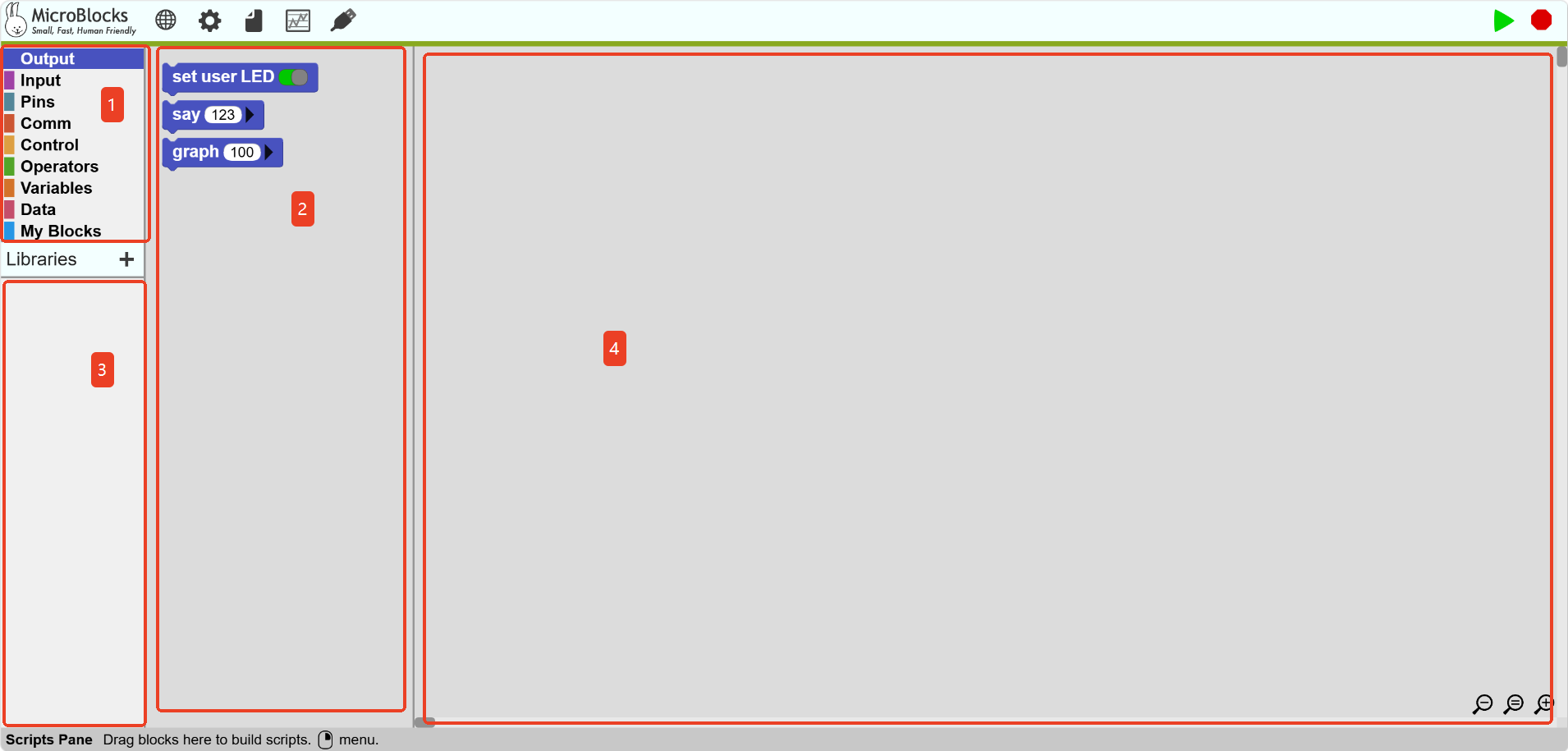
No. |
Name |
Function |
|---|---|---|
① |
Block Categories |
Click to display blocks in this category. |
② |
Block Area |
Drag blocks from here to build scripts. Blocks can be deleted by dragging them here. |
③ |
Block Library |
Click to display blocks in the block library. |
④ |
Script Area |
Drag blocks here to build scripts. |